
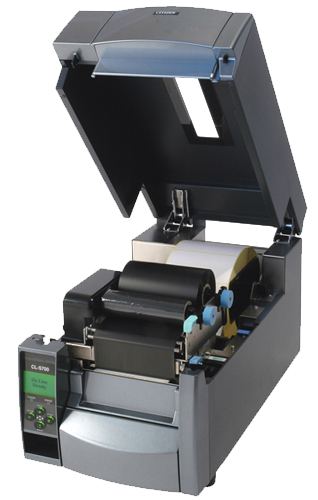
How to Select the Right Barcode Ribbon Size for Your PrinterWhen it comes to thermal transfer printing, the barcode ribbon is just as important as the label itself. Choosing the wrong size can lead to poor print quality, wasted materials, and unnecessary downtime. Whether you’re printing shipping labels in a warehouse, product barcodes in a factory, or asset tags in a hospital, selecting the correct ribbon width, length, and core type ensures your printer operates efficiently and your labels remain legible throughout their lifespan.
At Labels and Labeling, we are a trusted barcode label supplier in Dubai, offering a comprehensive range of thermal transfer ribbons for industrial, logistics, and retail applications. This guide will walk you through the key factors for selecting the perfect barcode ribbon for your printer.
Why Ribbon Size Matters
Using the wrong barcode ribbon size can cause several problems:
Print head damage: Ribbon that is narrower than the label can leave the print head exposed, leading to premature wear.
Wasted ribbon: A ribbon that is too wide results in unused material, increasing costs.
Poor print alignment: Mismatched widths can cause the ribbon to wrinkle, creating gaps or smudges on your labels.
Incorrect length: Choosing a ribbon that is too short for high-volume printing means frequent changes, reducing productivity.
By selecting the correct size, you maximize print head life, reduce waste, and maintain consistent output.
Step 1: Determine the Ribbon Width
The width of your barcode ribbon should match or slightly exceed the width of the labels you are printing.
Measure your label width: Use a ruler or refer to the label specifications.
Select ribbon width: For optimal print head protection, choose a ribbon that is at least as wide as the label, and ideally 5–10 mm wider. This ensures the print head is fully covered across the entire print width.
Common widths: 40 mm, 60 mm, 80 mm, 90 mm, 110 mm, 130 mm, 160 mm, and 220 mm are standard.
Tip: If you print multiple label widths on the same printer, select a ribbon width that covers the widest label you use.
Step 2: Choose the Right Ribbon Length
Ribbon length is measured in meters (m) and determines how many labels you can print before changing the roll.
Standard lengths: 300 m, 450 m, 600 m, 1000 m.
Consider your print volume: High-volume operations should opt for longer ribbons to reduce changeovers.
Check printer capacity: Not all printers accept larger rolls. Verify the maximum ribbon outer diameter (OD) your printer can accommodate.
Step 3: Verify Core Type and Compatibility
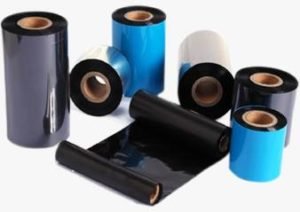
Thermal transfer ribbons are wound on either 1‑inch (25.4 mm) or 0.5‑inch (12.7 mm) cores.
1‑inch core: Most common for industrial printers. Typically used with ribbons 300 m or longer.
0.5‑inch core: Used in smaller desktop printers and for shorter ribbons (under 100 m).
Always confirm the core size your printer requires. Using the wrong core can prevent the printer from feeding the ribbon correctly.
Step 4: Match Ribbon Coating to Printer Type
While size is critical, the ribbon coating side (ink side) must also be compatible with your printer’s ribbon‑take‑up mechanism. Two main orientations exist:
Ink‑out: The ink is on the outside of the ribbon roll. This is the most common for industrial printers.
Ink‑in: The ink is on the inside of the roll. Used by some desktop and mobile printers.
Check your printer manual or look at a used ribbon to determine which orientation you need.
Step 5: Consider Ribbon Material (Wax, Resin, or Wax/Resin)
The ribbon material affects both print quality and durability. While size is the focus, pairing the right material with your application ensures your investment pays off.
Ribbon Type Best For Durability Wax Paper labels, shipping, retail Low to moderate Wax/Resin Synthetic labels, general industrial Good abrasion & chemical resistance Resin Synthetic labels, harsh environments, chemical/outdoor Excellent heat, chemical, and scratch resistance
Select the ribbon material based on your label substrate and the environment the label will face.
Step 6: Avoid Common Mistakes
Mixing ribbon widths incorrectly: A ribbon that is too narrow can damage the print head; too wide adds unnecessary cost.
Overlooking printer specifications: Always verify maximum ribbon OD, core size, and supported lengths before buying.
Not testing samples: Before committing to a bulk order, test a ribbon roll to ensure print quality and printer compatibility.
Why Labels and Labeling for Your Barcode Ribbon Needs
At Labels and Labeling, we pride ourselves on being a trusted barcode label supplier in Dubai, delivering excellence across the UAE. Our ribbon offerings include:
Wide selection: Wax, wax/resin, and resin ribbons in all standard widths, lengths, and core sizes.
Printer‑matched solutions: We help you select the correct ribbon for your specific printer brand and model (Zebra, Honeywell, Toshiba, etc.).
Quality assurance: All ribbons are sourced from reputable manufacturers to ensure consistent print quality and print head safety.
Expert support: Our team provides guidance on size selection, coating orientation, and material choice to maximize your printing efficiency.

Conclusion
Selecting the right barcode ribbon size is a simple yet crucial step in maintaining high‑quality printing and minimizing operational costs. By matching width to label size, choosing the appropriate length, verifying core compatibility, and considering the ribbon material, you can keep your printers running smoothly and your labels looking sharp.
When you need reliable ribbons and expert advice, Labels and Labeling is here to help. Contact us today to discuss your printing requirements.
Ready to find the perfect barcode ribbon for your printer?
Contact Labels and Labeling for a consultation and a competitive quote.
When it comes to thermal transfer printing, the barcode ribbon is just as important as the label itself. Choosing the wrong size can lead to poor print quality, wasted materials, and unnecessary downtime. Whether you’re printing shipping labels in a warehouse, product barcodes in a factory, or asset tags in a hospital, selecting the correct ribbon width, length, and core type ensures your printer operates efficiently and your labels remain legible throughout their lifespan.
At Labels and Labeling, we are a trusted barcode label supplier in Dubai, offering a comprehensive range of thermal transfer ribbons for industrial, logistics, and retail applications. This guide will walk you through the key factors for selecting the perfect barcode ribbon for your printer.
Why Ribbon Size Matters
Using the wrong barcode ribbon size can cause several problems:
Print head damage: Ribbon that is narrower than the label can leave the print head exposed, leading to premature wear.
Wasted ribbon: A ribbon that is too wide results in unused material, increasing costs.
Poor print alignment: Mismatched widths can cause the ribbon to wrinkle, creating gaps or smudges on your labels.
Incorrect length: Choosing a ribbon that is too short for high-volume printing means frequent changes, reducing productivity.
By selecting the correct size, you maximize print head life, reduce waste, and maintain consistent output.
Step 1: Determine the Ribbon Width
The width of your barcode ribbon should match or slightly exceed the width of the labels you are printing.
Measure your label width: Use a ruler or refer to the label specifications.
Select ribbon width: For optimal print head protection, choose a ribbon that is at least as wide as the label, and ideally 5–10 mm wider. This ensures the print head is fully covered across the entire print width.
Common widths: 40 mm, 60 mm, 80 mm, 90 mm, 110 mm, 130 mm, 160 mm, and 220 mm are standard.
Tip: If you print multiple label widths on the same printer, select a ribbon width that covers the widest label you use.
Step 2: Choose the Right Ribbon Length
Ribbon length is measured in meters (m) and determines how many labels you can print before changing the roll.
Standard lengths: 300 m, 450 m, 600 m, 1000 m.
Consider your print volume: High-volume operations should opt for longer ribbons to reduce changeovers.
Check printer capacity: Not all printers accept larger rolls. Verify the maximum ribbon outer diameter (OD) your printer can accommodate.
Step 3: Verify Core Type and Compatibility
Thermal transfer ribbons are wound on either 1‑inch (25.4 mm) or 0.5‑inch (12.7 mm) cores.
1‑inch core: Most common for industrial printers. Typically used with ribbons 300 m or longer.
0.5‑inch core: Used in smaller desktop printers and for shorter ribbons (under 100 m).
Always confirm the core size your printer requires. Using the wrong core can prevent the printer from feeding the ribbon correctly.
Step 4: Match Ribbon Coating to Printer Type
While size is critical, the ribbon coating side (ink side) must also be compatible with your printer’s ribbon‑take‑up mechanism. Two main orientations exist:
Ink‑out: The ink is on the outside of the ribbon roll. This is the most common for industrial printers.
Ink‑in: The ink is on the inside of the roll. Used by some desktop and mobile printers.
Check your printer manual or look at a used ribbon to determine which orientation you need.
Step 5: Consider Ribbon Material (Wax, Resin, or Wax/Resin)
The ribbon material affects both print quality and durability. While size is the focus, pairing the right material with your application ensures your investment pays off.
| Ribbon Type | Best For | Durability |
|---|---|---|
| Wax | Paper labels, shipping, retail | Low to moderate |
| Wax/Resin | Synthetic labels, general industrial | Good abrasion & chemical resistance |
| Resin | Synthetic labels, harsh environments, chemical/outdoor | Excellent heat, chemical, and scratch resistance |
Select the ribbon material based on your label substrate and the environment the label will face.
Step 6: Avoid Common Mistakes
Mixing ribbon widths incorrectly: A ribbon that is too narrow can damage the print head; too wide adds unnecessary cost.
Overlooking printer specifications: Always verify maximum ribbon OD, core size, and supported lengths before buying.
Not testing samples: Before committing to a bulk order, test a ribbon roll to ensure print quality and printer compatibility.
Why Labels and Labeling for Your Barcode Ribbon Needs
At Labels and Labeling, we pride ourselves on being a trusted barcode label supplier in Dubai, delivering excellence across the UAE. Our ribbon offerings include:
Wide selection: Wax, wax/resin, and resin ribbons in all standard widths, lengths, and core sizes.
Printer‑matched solutions: We help you select the correct ribbon for your specific printer brand and model (Zebra, Honeywell, Toshiba, etc.).
Quality assurance: All ribbons are sourced from reputable manufacturers to ensure consistent print quality and print head safety.
Expert support: Our team provides guidance on size selection, coating orientation, and material choice to maximize your printing efficiency.
Conclusion
Selecting the right barcode ribbon size is a simple yet crucial step in maintaining high‑quality printing and minimizing operational costs. By matching width to label size, choosing the appropriate length, verifying core compatibility, and considering the ribbon material, you can keep your printers running smoothly and your labels looking sharp.
When you need reliable ribbons and expert advice, Labels and Labeling is here to help. Contact us today to discuss your printing requirements.
Ready to find the perfect barcode ribbon for your printer?
Contact Labels and Labeling for a consultation and a competitive quote.