
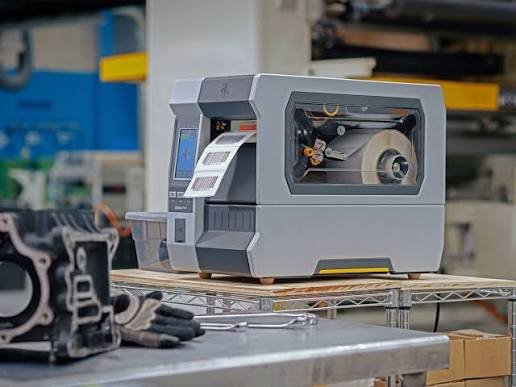
Industrial Barcode Printers: 4-Inch vs 6-Inch vs 8-Inch, and Which One You NeedAn industrial barcode printer is a thermal label printer built to run for whole shifts, with a metal frame, long ribbons and faster print speeds than a desktop model. The “4-inch”, “6-inch” or “8-inch” in its name is the widest area it can print across a label: about 104 mm, 168 mm or 216 mm. Choose the width from the widest label you print. A 4-inch printer handles standard 100 × 150 mm shipping labels, A5 pallet labels need a 6-inch printer, and 8-inch printers are for oversized labels and documents that very few businesses print.
The mix-up we see most often is someone asking for a six-inch printer because they print “4 × 6” shipping labels. That label is four inches wide. The six is its length, and a four-inch printer prints it all day. Getting the width right matters, because the six-inch version of the same printer usually costs two to three times as much.
What 4-inch, 6-inch and 8-inch actually measure
The number is the printer’s maximum print width, the widest strip the printhead can cover. Label length is a separate question, and industrial printers will print labels much longer than they are wide.
Here is how four common models compare, using the manufacturers’ published specifications:
Zebra ZT411 Zebra ZT421 Citizen CL-S6621 TSC T8000 8-inch Width class 4-inch industrial 6-inch industrial 6-inch desktop 8-inch industrial Maximum print width 104 mm 168 mm 168 mm 216 mm Resolution 203, 300 or 600 dpi 203 or 300 dpi 203 or 300 dpi 203 dpi (T8208) or 300 dpi (T8308) Top print speed 356 mm/s at 203 dpi 305 mm/s at 203 dpi 150 mm/s 254 mm/s (T8208)
Two things in that table surprise people. A wider printer is not a faster one: according to Zebra’s specifications, the six-inch ZT421 tops out a little below its four-inch sibling. And 600 dpi is offered only on the four-inch ZT411. If you print very small labels where even 300 dpi isn’t sharp enough, a six-inch printer is the wrong tool however much budget you have.
Match the printer to your widest label
What you’re printing Label width Printer width Product, price and shelf labels Under 100 mm 4-inch, or a desktop printer if volumes are modest Courier shipping labels (4 × 6 inch) 100 mm 4-inch GS1 pallet labels, A6 size 105 mm 4-inch, with the design kept inside the 104 mm print area GS1 pallet labels, A5 size 148 mm 6-inch Large carton and drum labels 150 to 168 mm 6-inch Labels wider than 168 mm, or full documents Over 168 mm 8-inch
Pallet labels are where most businesses first hit the four-inch limit. GS1’s guidance on pallet labels says A6 and A5 are the most common formats and that A5 is often the better choice, because it leaves room for everything the label has to carry. The SSCC, the pallet’s unique serial number, is the only mandatory piece of data, and it always goes in the lowest barcode on the label. If a retailer or distributor you supply asks for A5 pallet labels, you need six-inch width. We supply warehouse and logistics labels for both.
A six-inch printer will also print narrower labels. The Citizen CL-S6621, for example, takes media from 50 mm to 178 mm wide, so one printer can run your A5 pallet labels in the morning and your 100 mm carton labels in the afternoon.
Industrial or desktop?
Width and build are separate decisions. You can buy six-inch width in a desktop printer and four-inch width in an industrial one.
An industrial printer earns its price when it runs for long stretches. It takes longer ribbons, up to 450 m on the ZT411 against 74 m on a small desktop model like the Zebra ZD421t, so ribbons get changed far less often. The frame and print mechanism are metal, and the printer is designed to sit on a production line or in a dispatch bay and keep printing through a shift.
If your printer works in short bursts, a desktop model is fine and costs far less. Our rule of thumb: if someone is standing at the printer waiting for labels several times an hour, or it runs through whole shifts, buy industrial. If it prints a batch in the morning and sits idle for the rest of the day, don’t.
The Citizen CL-S6621 sits between the two. Citizen sells it as a desktop printer for mid-volume work, but it has a metal mechanism inside an industrial ABS case, takes 360 m ribbons on a 1-inch core, and prints up to 168 mm wide at 203 or 300 dpi. At 150 mm/s it runs at about half the speed of a ZT421. For a warehouse office that prints A5 pallet labels in batches, it’s the lower-cost way to get six-inch width. We’re the authorised regional service centre for Citizen barcode printers in the UAE and GCC, so repairs and parts are handled here.
What industrial barcode printers cost in the UAE
These are public UAE prices checked in November 2026. They move with stock and exchange rates, so use them as a guide and ask for a current quote.
Printer class Example Typical UAE price 4-inch industrial Zebra ZT411, 203 dpi About AED 3,300 to AED 5,600, depending on the seller 6-inch industrial Zebra ZT421 Usually quoted on request; expect two to three times the 4-inch price 8-inch industrial TSC T8000 8-inch Quoted per project
For TSC’s desktop and industrial models, see our TSC printer price guide.
Running costs rise with width as well. A wider label needs a wider ribbon, and a 6-inch ribbon costs more per metre than a 4-inch one. Before you buy a six-inch printer “just in case”, work out how many of your labels actually need the extra width.
Ribbons for wide printers
The ribbon must be at least as wide as the label. If it’s narrower, the edges of the printhead rub directly on the label and wear out, and a replacement printhead is an expensive repair. On a six-inch printer that runs labels of different widths, keep a ribbon width for each label size rather than running a wide ribbon on narrow labels and wasting the rest of it.
Use wax ribbons for paper labels and resin ribbons for synthetic labels such as polyester, especially where labels face heat, chemicals or outdoor use. Industrial printers also take longer rolls: 450 m on the ZT411, 360 m on the CL-S6621 and 625 m on the TSC T8000. Check your model’s core size and which side of the ribbon is coated before you order, or send us your printer model and label size from our barcode ribbons range and we’ll match it.
Questions to answer before you buy
- What is the widest label you print today, and could a customer ask for something wider next year? Replacing a printer twelve months after buying it is the expensive way to find out.
- How many labels do you print a day, and do they come in batches or continuously?
- Are your labels paper or synthetic? That decides the ribbon.
- What is the smallest barcode or text on the label? Fine print needs 300 dpi, and very small labels may need the 600 dpi that only four-inch models offer.
- Does it print from one PC or across a network, and from which software? Industrial printers work with label printing software such as BarTender.
- Do you need a cutter, a peeler or RFID encoding? These are options on some models and not on others, so decide before you compare prices.
If you’re unsure whether your labels need direct thermal or thermal transfer printing, settle that first. It affects both the printer and the running cost.
Get the width right the first time
Send us your label sizes, a rough daily volume and what the labels go on. We’ll tell you whether you need four-inch, six-inch or eight-inch, whether a desktop or industrial printer makes more sense, and quote the printer with matching labels and ribbons. We supply Zebra, Citizen, TSC and Honeywell barcode printers, and our service team repairs all brands of barcode and label printers, including under AMC contracts.
Visit: Office M04, AB Plaza-2 Building, near Al Qiyada Metro Station, Abuhail, Deira, Dubai · Call: +971 4 2715807 · Mobile: +971 55 7994752 · Email: sales@labelsandlabeling.ae
Frequently asked questions
What is an industrial barcode printer?
A thermal label printer designed to run for long periods, usually with a metal frame, longer ribbons and faster print speeds than a desktop printer. The Zebra ZT411 and ZT421 and TSC’s T8000 series are examples.
What is the difference between a 4-inch and a 6-inch barcode printer?
The maximum print width. A 4-inch printer prints up to about 104 mm across a label and a 6-inch printer up to about 168 mm. Choose by the widest label you print. A 6-inch model usually costs two to three times as much as the 4-inch version of the same printer.
Do I need a 6-inch printer for 4 × 6 shipping labels?
No. A 4 × 6 inch shipping label is 4 inches (about 100 mm) wide, so a 4-inch printer prints it. The 6 refers to the label’s length.
Which printer do I need for A5 pallet labels?
A 6-inch printer. A5 labels are 148 mm wide, which is wider than the 104 mm a 4-inch printer can print. A6 pallet labels, at 105 mm wide, can be printed on a 4-inch printer if the design stays inside the print area.
How much does an industrial barcode printer cost in Dubai?
In November 2026, UAE listings for the 4-inch Zebra ZT411 at 203 dpi ranged from about AED 3,300 to AED 5,600. Six-inch industrial printers are usually quoted on request and cost roughly two to three times the 4-inch price. Eight-inch printers are quoted per project.
Is an 8-inch barcode printer worth it?
Only if you print labels wider than 168 mm, such as very large carton or drum labels, or full documents. For anything up to A5 size, a 6-inch printer does the job for less.
An industrial barcode printer is a thermal label printer built to run for whole shifts, with a metal frame, long ribbons and faster print speeds than a desktop model. The “4-inch”, “6-inch” or “8-inch” in its name is the widest area it can print across a label: about 104 mm, 168 mm or 216 mm. Choose the width from the widest label you print. A 4-inch printer handles standard 100 × 150 mm shipping labels, A5 pallet labels need a 6-inch printer, and 8-inch printers are for oversized labels and documents that very few businesses print.
The mix-up we see most often is someone asking for a six-inch printer because they print “4 × 6” shipping labels. That label is four inches wide. The six is its length, and a four-inch printer prints it all day. Getting the width right matters, because the six-inch version of the same printer usually costs two to three times as much.
What 4-inch, 6-inch and 8-inch actually measure
The number is the printer’s maximum print width, the widest strip the printhead can cover. Label length is a separate question, and industrial printers will print labels much longer than they are wide.
Here is how four common models compare, using the manufacturers’ published specifications:
| Zebra ZT411 | Zebra ZT421 | Citizen CL-S6621 | TSC T8000 8-inch | |
| Width class | 4-inch industrial | 6-inch industrial | 6-inch desktop | 8-inch industrial |
| Maximum print width | 104 mm | 168 mm | 168 mm | 216 mm |
| Resolution | 203, 300 or 600 dpi | 203 or 300 dpi | 203 or 300 dpi | 203 dpi (T8208) or 300 dpi (T8308) |
| Top print speed | 356 mm/s at 203 dpi | 305 mm/s at 203 dpi | 150 mm/s | 254 mm/s (T8208) |
Two things in that table surprise people. A wider printer is not a faster one: according to Zebra’s specifications, the six-inch ZT421 tops out a little below its four-inch sibling. And 600 dpi is offered only on the four-inch ZT411. If you print very small labels where even 300 dpi isn’t sharp enough, a six-inch printer is the wrong tool however much budget you have.
Match the printer to your widest label
| What you’re printing | Label width | Printer width |
| Product, price and shelf labels | Under 100 mm | 4-inch, or a desktop printer if volumes are modest |
| Courier shipping labels (4 × 6 inch) | 100 mm | 4-inch |
| GS1 pallet labels, A6 size | 105 mm | 4-inch, with the design kept inside the 104 mm print area |
| GS1 pallet labels, A5 size | 148 mm | 6-inch |
| Large carton and drum labels | 150 to 168 mm | 6-inch |
| Labels wider than 168 mm, or full documents | Over 168 mm | 8-inch |
Pallet labels are where most businesses first hit the four-inch limit. GS1’s guidance on pallet labels says A6 and A5 are the most common formats and that A5 is often the better choice, because it leaves room for everything the label has to carry. The SSCC, the pallet’s unique serial number, is the only mandatory piece of data, and it always goes in the lowest barcode on the label. If a retailer or distributor you supply asks for A5 pallet labels, you need six-inch width. We supply warehouse and logistics labels for both.
A six-inch printer will also print narrower labels. The Citizen CL-S6621, for example, takes media from 50 mm to 178 mm wide, so one printer can run your A5 pallet labels in the morning and your 100 mm carton labels in the afternoon.
Industrial or desktop?
Width and build are separate decisions. You can buy six-inch width in a desktop printer and four-inch width in an industrial one.
An industrial printer earns its price when it runs for long stretches. It takes longer ribbons, up to 450 m on the ZT411 against 74 m on a small desktop model like the Zebra ZD421t, so ribbons get changed far less often. The frame and print mechanism are metal, and the printer is designed to sit on a production line or in a dispatch bay and keep printing through a shift.
If your printer works in short bursts, a desktop model is fine and costs far less. Our rule of thumb: if someone is standing at the printer waiting for labels several times an hour, or it runs through whole shifts, buy industrial. If it prints a batch in the morning and sits idle for the rest of the day, don’t.
The Citizen CL-S6621 sits between the two. Citizen sells it as a desktop printer for mid-volume work, but it has a metal mechanism inside an industrial ABS case, takes 360 m ribbons on a 1-inch core, and prints up to 168 mm wide at 203 or 300 dpi. At 150 mm/s it runs at about half the speed of a ZT421. For a warehouse office that prints A5 pallet labels in batches, it’s the lower-cost way to get six-inch width. We’re the authorised regional service centre for Citizen barcode printers in the UAE and GCC, so repairs and parts are handled here.
What industrial barcode printers cost in the UAE
These are public UAE prices checked in November 2026. They move with stock and exchange rates, so use them as a guide and ask for a current quote.
| Printer class | Example | Typical UAE price |
| 4-inch industrial | Zebra ZT411, 203 dpi | About AED 3,300 to AED 5,600, depending on the seller |
| 6-inch industrial | Zebra ZT421 | Usually quoted on request; expect two to three times the 4-inch price |
| 8-inch industrial | TSC T8000 8-inch | Quoted per project |
For TSC’s desktop and industrial models, see our TSC printer price guide.
Running costs rise with width as well. A wider label needs a wider ribbon, and a 6-inch ribbon costs more per metre than a 4-inch one. Before you buy a six-inch printer “just in case”, work out how many of your labels actually need the extra width.
Ribbons for wide printers
The ribbon must be at least as wide as the label. If it’s narrower, the edges of the printhead rub directly on the label and wear out, and a replacement printhead is an expensive repair. On a six-inch printer that runs labels of different widths, keep a ribbon width for each label size rather than running a wide ribbon on narrow labels and wasting the rest of it.
Use wax ribbons for paper labels and resin ribbons for synthetic labels such as polyester, especially where labels face heat, chemicals or outdoor use. Industrial printers also take longer rolls: 450 m on the ZT411, 360 m on the CL-S6621 and 625 m on the TSC T8000. Check your model’s core size and which side of the ribbon is coated before you order, or send us your printer model and label size from our barcode ribbons range and we’ll match it.
Questions to answer before you buy
- What is the widest label you print today, and could a customer ask for something wider next year? Replacing a printer twelve months after buying it is the expensive way to find out.
- How many labels do you print a day, and do they come in batches or continuously?
- Are your labels paper or synthetic? That decides the ribbon.
- What is the smallest barcode or text on the label? Fine print needs 300 dpi, and very small labels may need the 600 dpi that only four-inch models offer.
- Does it print from one PC or across a network, and from which software? Industrial printers work with label printing software such as BarTender.
- Do you need a cutter, a peeler or RFID encoding? These are options on some models and not on others, so decide before you compare prices.
If you’re unsure whether your labels need direct thermal or thermal transfer printing, settle that first. It affects both the printer and the running cost.
Get the width right the first time
Send us your label sizes, a rough daily volume and what the labels go on. We’ll tell you whether you need four-inch, six-inch or eight-inch, whether a desktop or industrial printer makes more sense, and quote the printer with matching labels and ribbons. We supply Zebra, Citizen, TSC and Honeywell barcode printers, and our service team repairs all brands of barcode and label printers, including under AMC contracts.
Visit: Office M04, AB Plaza-2 Building, near Al Qiyada Metro Station, Abuhail, Deira, Dubai · Call: +971 4 2715807 · Mobile: +971 55 7994752 · Email: sales@labelsandlabeling.ae
Frequently asked questions
What is an industrial barcode printer?
A thermal label printer designed to run for long periods, usually with a metal frame, longer ribbons and faster print speeds than a desktop printer. The Zebra ZT411 and ZT421 and TSC’s T8000 series are examples.
What is the difference between a 4-inch and a 6-inch barcode printer?
The maximum print width. A 4-inch printer prints up to about 104 mm across a label and a 6-inch printer up to about 168 mm. Choose by the widest label you print. A 6-inch model usually costs two to three times as much as the 4-inch version of the same printer.
Do I need a 6-inch printer for 4 × 6 shipping labels?
No. A 4 × 6 inch shipping label is 4 inches (about 100 mm) wide, so a 4-inch printer prints it. The 6 refers to the label’s length.
Which printer do I need for A5 pallet labels?
A 6-inch printer. A5 labels are 148 mm wide, which is wider than the 104 mm a 4-inch printer can print. A6 pallet labels, at 105 mm wide, can be printed on a 4-inch printer if the design stays inside the print area.
How much does an industrial barcode printer cost in Dubai?
In November 2026, UAE listings for the 4-inch Zebra ZT411 at 203 dpi ranged from about AED 3,300 to AED 5,600. Six-inch industrial printers are usually quoted on request and cost roughly two to three times the 4-inch price. Eight-inch printers are quoted per project.
Is an 8-inch barcode printer worth it?
Only if you print labels wider than 168 mm, such as very large carton or drum labels, or full documents. For anything up to A5 size, a 6-inch printer does the job for less.