
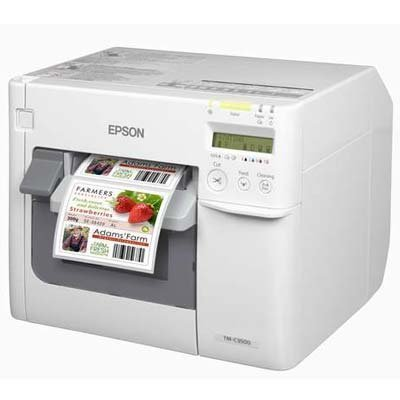
Colour Barcode Printers: Your Options, Which Colours Scan, and What They CostStandard barcode label printers print one colour at a time. A thermal transfer printer prints in the colour of whatever ribbon is loaded, usually black, and a direct thermal printer normally prints black only. If you want a colour barcode printer that produces full-colour labels on demand, you need a colour inkjet label printer such as a model from Epson’s ColorWorks range. The two we priced in the UAE were listed at about AED 6,000 and AED 34,650. For most businesses the cheaper route is to have the colour design pre-printed on the labels and add the barcode and changing data with an ordinary thermal printer.
That last option is the one we’d recommend to most businesses, and it’s worth understanding why before you spend money on a colour printer.
Three ways to get colour on a barcode label
Option What you get Best for Thermal printer with a coloured ribbon One colour per ribbon, such as red, blue or green Colour-coded text and simple markings Pre-printed colour labels, overprinted on a thermal printer A full-colour design, with barcodes, batch numbers and dates printed in black Branded product labels in steady volumes Colour inkjet label printer Full colour, and every label can be different Many products in small quantities, or designs that change often
Option 1: coloured ribbons on a thermal printer
Thermal transfer ribbons aren’t only black. Wax/resin ribbons are made in colours such as red, blue and green, and they fit the same printers as black ribbons. You get one colour at a time, so changing colour means changing the ribbon.
This works well for colour coding: red handling warnings, a blue batch line, a green department code. It won’t give you photographs, gradients or a full-colour logo. And don’t print the barcode itself in red. Scanners read barcodes with red light, and red bars disappear under it (more on barcode colours below).
Option 2: pre-printed colour labels with a thermal overprint
The colour parts of the design, such as your logo, background and product artwork, are printed on the label roll in advance. Your own thermal printer then adds whatever changes from label to label: the barcode, price, batch number or expiry date.
You get the look of a full-colour label without buying a colour printer or ink, and the thermal label printer you already own keeps doing what it’s good at. Leave a plain white area in the design for the barcode and variable text, so they print on a clean, light background.
We do custom label printing in colour, on a range of materials and with specialty finishes, and we can supply pre-printed labels with your data already on them. Because a printed run needs artwork approval and production time, order enough to cover a few months rather than a few weeks.
Option 3: colour inkjet label printers
Colour label printers use inkjet printing, not thermal. Epson’s ColorWorks range is a common example, and two of its models show how wide the price spread is (public UAE listings, November 2026):
Epson ColorWorks TM-C3500 Epson ColorWorks CW-C6000Ae Maximum print width 104 mm 108 mm Print speed Up to 103 mm/s Up to 119 mm/s Ink Pigment Pigment (Epson UltraChrome DL) Typical UAE price About AED 6,000 including VAT About AED 34,650
The CW-C6000Ae prints at up to 1200 × 1200 dpi and has a built-in cutter. Epson also makes C6500 versions that print up to about 8 inches wide.
Before you buy one, know what you’re signing up for:
- Inkjet printers need inkjet label stock. Thermal labels won’t take the ink, so your existing rolls won’t work.
- You pay for ink on every label, and full-colour designs use more of it.
- They’re slower than industrial thermal printers. A four-inch Zebra ZT411 prints at up to 356 mm/s, against 119 mm/s for the CW-C6000Ae.
A colour inkjet printer earns its place when you sell many products in small quantities, change designs often, or need short runs for samples and trials. If you print thousands of the same label, pre-printed colour with a thermal overprint will usually cost less per label.
What colour should the barcode be?
Colour on the label is fine. Colour in the barcode needs care, and GS1 UK’s guidance on barcode colours is clear:
- The best combination is black bars on a white background.
- Other dark bar colours, such as dark blue or dark green, can work.
- Never use red or reddish colours, including brown, for the bars. Scanners use red light, so those bars are invisible to them.
- The background must be light. Light bars on a dark background, known as a reversed barcode, can’t be read.
- On clear or semi-transparent packaging, don’t rely on the product inside to provide the background colour.
Scanners need clear contrast between bars and spaces. If you’re designing a colour label, test the barcode on a real scanner before printing a full run. Our guides on designing barcode labels that scan and why barcode labels don’t scan go into more detail.
Colour coding without a colour printer
Plenty of “we need a colour printer” requests turn out to be about colour coding: rack levels in a warehouse, storage zones, stock rotation or hazard classes. Labels with a pre-printed colour band handle this well, with the location code and barcode printed in black on a white area. See our rack labels, warehouse bin location labels and hazard labels.
Planning colour labels for the season
If you’re planning colour promotional labels for Ramadan, which is expected to begin around 8 February 2027, order pre-printed runs early so there’s time for artwork approval and production. For Dubai Shopping Festival, which runs from 4 December 2026 to 17 January 2027, time is already short, so a coloured ribbon on your existing thermal printer may be the quicker way to add promotional text.
Which colour barcode printer option suits you?
- You want colour-coded text or one highlighted line: a coloured ribbon on your current printer.
- You print the same branded label in steady volumes: pre-printed colour labels, overprinted in-house.
- You have dozens of products, small runs and designs that keep changing: a colour inkjet label printer.
Tell us what you’re labelling, how many designs you have and roughly how many labels you use a month, and we’ll tell you which route costs less. If it’s the pre-printed route, we’ll quote the labels and the ribbons together.
Visit: Office M04, AB Plaza-2 Building, near Al Qiyada Metro Station, Abuhail, Deira, Dubai · Call: +971 4 2715807 · Mobile: +971 55 7994752 · Email: sales@labelsandlabeling.ae
Frequently asked questions
Can a thermal barcode printer print in colour?
One colour at a time. A thermal transfer printer prints in the colour of its ribbon, and coloured ribbons such as red, blue and green are available. It can’t print full-colour images. Direct thermal printers normally print black only.
How much does a colour label printer cost in the UAE?
In November 2026, UAE listings showed the Epson ColorWorks TM-C3500 at about AED 6,000 including VAT and the CW-C6000Ae at about AED 34,650. You also need inkjet label stock and ink.
What colour should a barcode be?
Black bars on a white background scan best. Dark blue or dark green bars can work. Avoid red, brown and other reddish colours for the bars, and never print light bars on a dark background.
Why won’t a red barcode scan?
Barcode scanners use red light. Red bars reflect that light much as the white background does, so the scanner can’t tell the bars from the spaces.
Do colour label printers need special labels?
Yes. Colour inkjet label printers need inkjet-compatible label stock. Standard thermal labels won’t take the ink.
What is the cheapest way to get colour labels with barcodes?
For steady volumes, have the colour design pre-printed on the labels and print the barcode and changing data in black with your existing thermal printer.
Standard barcode label printers print one colour at a time. A thermal transfer printer prints in the colour of whatever ribbon is loaded, usually black, and a direct thermal printer normally prints black only. If you want a colour barcode printer that produces full-colour labels on demand, you need a colour inkjet label printer such as a model from Epson’s ColorWorks range. The two we priced in the UAE were listed at about AED 6,000 and AED 34,650. For most businesses the cheaper route is to have the colour design pre-printed on the labels and add the barcode and changing data with an ordinary thermal printer.
That last option is the one we’d recommend to most businesses, and it’s worth understanding why before you spend money on a colour printer.
Three ways to get colour on a barcode label
| Option | What you get | Best for |
| Thermal printer with a coloured ribbon | One colour per ribbon, such as red, blue or green | Colour-coded text and simple markings |
| Pre-printed colour labels, overprinted on a thermal printer | A full-colour design, with barcodes, batch numbers and dates printed in black | Branded product labels in steady volumes |
| Colour inkjet label printer | Full colour, and every label can be different | Many products in small quantities, or designs that change often |
Option 1: coloured ribbons on a thermal printer
Thermal transfer ribbons aren’t only black. Wax/resin ribbons are made in colours such as red, blue and green, and they fit the same printers as black ribbons. You get one colour at a time, so changing colour means changing the ribbon.
This works well for colour coding: red handling warnings, a blue batch line, a green department code. It won’t give you photographs, gradients or a full-colour logo. And don’t print the barcode itself in red. Scanners read barcodes with red light, and red bars disappear under it (more on barcode colours below).
Option 2: pre-printed colour labels with a thermal overprint
The colour parts of the design, such as your logo, background and product artwork, are printed on the label roll in advance. Your own thermal printer then adds whatever changes from label to label: the barcode, price, batch number or expiry date.
You get the look of a full-colour label without buying a colour printer or ink, and the thermal label printer you already own keeps doing what it’s good at. Leave a plain white area in the design for the barcode and variable text, so they print on a clean, light background.
We do custom label printing in colour, on a range of materials and with specialty finishes, and we can supply pre-printed labels with your data already on them. Because a printed run needs artwork approval and production time, order enough to cover a few months rather than a few weeks.
Option 3: colour inkjet label printers
Colour label printers use inkjet printing, not thermal. Epson’s ColorWorks range is a common example, and two of its models show how wide the price spread is (public UAE listings, November 2026):
| Epson ColorWorks TM-C3500 | Epson ColorWorks CW-C6000Ae | |
| Maximum print width | 104 mm | 108 mm |
| Print speed | Up to 103 mm/s | Up to 119 mm/s |
| Ink | Pigment | Pigment (Epson UltraChrome DL) |
| Typical UAE price | About AED 6,000 including VAT | About AED 34,650 |
The CW-C6000Ae prints at up to 1200 × 1200 dpi and has a built-in cutter. Epson also makes C6500 versions that print up to about 8 inches wide.
Before you buy one, know what you’re signing up for:
- Inkjet printers need inkjet label stock. Thermal labels won’t take the ink, so your existing rolls won’t work.
- You pay for ink on every label, and full-colour designs use more of it.
- They’re slower than industrial thermal printers. A four-inch Zebra ZT411 prints at up to 356 mm/s, against 119 mm/s for the CW-C6000Ae.
A colour inkjet printer earns its place when you sell many products in small quantities, change designs often, or need short runs for samples and trials. If you print thousands of the same label, pre-printed colour with a thermal overprint will usually cost less per label.
What colour should the barcode be?
Colour on the label is fine. Colour in the barcode needs care, and GS1 UK’s guidance on barcode colours is clear:
- The best combination is black bars on a white background.
- Other dark bar colours, such as dark blue or dark green, can work.
- Never use red or reddish colours, including brown, for the bars. Scanners use red light, so those bars are invisible to them.
- The background must be light. Light bars on a dark background, known as a reversed barcode, can’t be read.
- On clear or semi-transparent packaging, don’t rely on the product inside to provide the background colour.
Scanners need clear contrast between bars and spaces. If you’re designing a colour label, test the barcode on a real scanner before printing a full run. Our guides on designing barcode labels that scan and why barcode labels don’t scan go into more detail.
Colour coding without a colour printer
Plenty of “we need a colour printer” requests turn out to be about colour coding: rack levels in a warehouse, storage zones, stock rotation or hazard classes. Labels with a pre-printed colour band handle this well, with the location code and barcode printed in black on a white area. See our rack labels, warehouse bin location labels and hazard labels.
Planning colour labels for the season
If you’re planning colour promotional labels for Ramadan, which is expected to begin around 8 February 2027, order pre-printed runs early so there’s time for artwork approval and production. For Dubai Shopping Festival, which runs from 4 December 2026 to 17 January 2027, time is already short, so a coloured ribbon on your existing thermal printer may be the quicker way to add promotional text.
Which colour barcode printer option suits you?
- You want colour-coded text or one highlighted line: a coloured ribbon on your current printer.
- You print the same branded label in steady volumes: pre-printed colour labels, overprinted in-house.
- You have dozens of products, small runs and designs that keep changing: a colour inkjet label printer.
Tell us what you’re labelling, how many designs you have and roughly how many labels you use a month, and we’ll tell you which route costs less. If it’s the pre-printed route, we’ll quote the labels and the ribbons together.
Visit: Office M04, AB Plaza-2 Building, near Al Qiyada Metro Station, Abuhail, Deira, Dubai · Call: +971 4 2715807 · Mobile: +971 55 7994752 · Email: sales@labelsandlabeling.ae
Frequently asked questions
Can a thermal barcode printer print in colour?
One colour at a time. A thermal transfer printer prints in the colour of its ribbon, and coloured ribbons such as red, blue and green are available. It can’t print full-colour images. Direct thermal printers normally print black only.
How much does a colour label printer cost in the UAE?
In November 2026, UAE listings showed the Epson ColorWorks TM-C3500 at about AED 6,000 including VAT and the CW-C6000Ae at about AED 34,650. You also need inkjet label stock and ink.
What colour should a barcode be?
Black bars on a white background scan best. Dark blue or dark green bars can work. Avoid red, brown and other reddish colours for the bars, and never print light bars on a dark background.
Why won’t a red barcode scan?
Barcode scanners use red light. Red bars reflect that light much as the white background does, so the scanner can’t tell the bars from the spaces.
Do colour label printers need special labels?
Yes. Colour inkjet label printers need inkjet-compatible label stock. Standard thermal labels won’t take the ink.
What is the cheapest way to get colour labels with barcodes?
For steady volumes, have the colour design pre-printed on the labels and print the barcode and changing data in black with your existing thermal printer.