
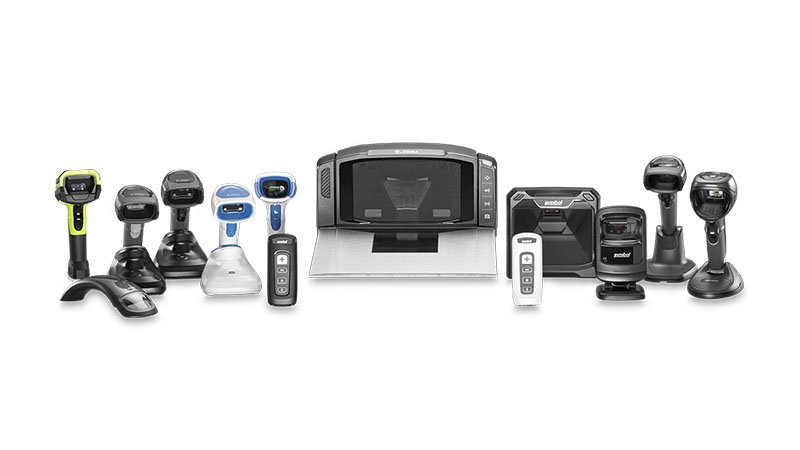
How to Choose a Barcode Scanner for a Warehouse in DubaiPicking the wrong barcode scanner for a busy Dubai warehouse is an expensive mistake. Buy an entry-level scanner and your team fights slow reads and dropped connections during peak dispatch; over-spec a rugged industrial unit for a small stockroom and you’ve paid for durability you’ll never use. This guide walks through the five decisions that actually matter — barcode type, connectivity, environment, scan volume, and software — so you choose right the first time.
Short answer: for most UAE warehouses, a wireless 2D imager rated for daily industrial use is the safest all-round choice — it reads both 1D and QR/2D codes, frees staff to move around racking, and survives the drops and dust of a working warehouse. The rest of this guide explains when to deviate from that default.

1. Decide between a 1D and a 2D scanner
A 1D scanner reads traditional linear barcodes (the parallel-lines type on most retail and carton labels). A 2D scanner reads those same 1D codes plus QR codes and Data Matrix codes — the square, dot-pattern codes used for serial numbers, batch data, and mobile-based systems.
For a warehouse, a 2D imager is almost always the better buy even if you only use 1D codes today. It reads a damaged or poorly-printed barcode more reliably (it captures an image rather than sweeping a laser line), it reads codes off a screen, and it future-proofs you for the 2D codes that GS1 and most WMS platforms are moving toward. Choose 1D-only laser scanners just for simple, high-speed retail checkout or the tightest budgets.
2. Choose your connection: wired, Bluetooth, or Wi-Fi
Match connectivity to how far your staff move from the computer. A wired USB scanner is cheapest and never needs charging — ideal for a fixed packing bench or POS counter. A Bluetooth scanner lets a worker scan pallets a few metres from the base while staying tethered to one workstation. A Wi-Fi mobile computer (with an onboard screen and OS) is what you want when staff roam the whole floor picking against a live WMS.
3. Match the build to your environment
Warehouse conditions decide how rugged you need to go. Look at three things: drop rating (how far it can fall onto concrete and survive — 1.5m to 1.8m is typical for industrial units), IP rating (protection from dust and moisture; IP54+ for dusty floors, higher for wash-down or cold-chain areas), and operating temperature if you run chilled or freezer storage, where standard electronics and screens can fail.
4. Size the scanner to your scan volume
Occasional scanning and constant scanning need different hardware. For a few hundred scans a day, a value 2D scanner is fine. For thousands of scans across a shift — high-throughput dispatch, e-commerce fulfilment — invest in a mid-range or premium unit with faster decode speed, a more durable trigger mechanism, and a battery that lasts a full shift, so the device isn’t the bottleneck.
5. Confirm software and system compatibility
A scanner is only as good as its fit with your system. Most USB scanners work in “keyboard wedge” mode — they type the scanned data straight into whatever field is active, so they work with almost any software including Excel, ERP, or a WMS with no drivers. If you run a specific warehouse or inventory platform, confirm the scanner (or Android mobile computer) is certified for it before buying, and check whether you need SDK support for a custom app.
Which brands to consider in the UAE
The scanners most Dubai warehouses standardise on come from Zebra, Datalogic, and Honeywell — all three make proven industrial 1D and 2D units with local service support. Zebra and Datalogic dominate rugged warehouse use; Honeywell is strong across warehouse and retail. As an authorised supplier in Dubai, Labels & Labeling stocks and supports all three and can match the exact model to your racking, software, and budget rather than upselling a device you don’t need.
Quick decision summary
If you take nothing else from this guide: choose a 2D imager, pick wireless if staff move around, check the drop and IP ratings against your floor conditions, and confirm software compatibility before you buy. When in doubt, tell your supplier your exact use case and let them spec it.
Frequently Asked Questions
Q: What is the best barcode scanner for a warehouse?
For most warehouses, a wireless 2D imager with an industrial drop and IP rating is the best all-round choice. It reads both 1D and 2D codes, handles damaged labels, and lets staff move freely around racking. High-volume dispatch operations should step up to a premium model with faster decode speed and full-shift battery life.
Q: What is the difference between a 1D and 2D barcode scanner?
A 1D scanner reads only linear (parallel-line) barcodes. A 2D scanner reads 1D barcodes plus QR codes and Data Matrix codes, reads damaged or on-screen codes more reliably, and future-proofs you for newer 2D-based systems. For warehouses, 2D is usually the better long-term choice.
Q: Do I need a wireless or wired barcode scanner?
Use a wired scanner for a fixed packing bench or checkout — it’s cheaper and never needs charging. Use a wireless (Bluetooth or Wi-Fi) scanner when staff move away from the workstation to scan pallets or pick across the floor.
Q: Will a barcode scanner work with my existing software?
Most USB barcode scanners work in keyboard-wedge mode, entering scanned data directly into any active field — so they work with Excel, ERP systems, and most WMS platforms without drivers. For specialised warehouse software, confirm certification with your supplier before buying.
Q: Which barcode scanner brands are available in Dubai?
Zebra, Datalogic, and Honeywell are the main industrial brands used across UAE warehouses, all with local service support. Labels & Labeling is an authorised supplier for these brands in Dubai and can recommend the right model for your operation.
Picking the wrong barcode scanner for a busy Dubai warehouse is an expensive mistake. Buy an entry-level scanner and your team fights slow reads and dropped connections during peak dispatch; over-spec a rugged industrial unit for a small stockroom and you’ve paid for durability you’ll never use. This guide walks through the five decisions that actually matter — barcode type, connectivity, environment, scan volume, and software — so you choose right the first time.
Short answer: for most UAE warehouses, a wireless 2D imager rated for daily industrial use is the safest all-round choice — it reads both 1D and QR/2D codes, frees staff to move around racking, and survives the drops and dust of a working warehouse. The rest of this guide explains when to deviate from that default.
1. Decide between a 1D and a 2D scanner
A 1D scanner reads traditional linear barcodes (the parallel-lines type on most retail and carton labels). A 2D scanner reads those same 1D codes plus QR codes and Data Matrix codes — the square, dot-pattern codes used for serial numbers, batch data, and mobile-based systems.
For a warehouse, a 2D imager is almost always the better buy even if you only use 1D codes today. It reads a damaged or poorly-printed barcode more reliably (it captures an image rather than sweeping a laser line), it reads codes off a screen, and it future-proofs you for the 2D codes that GS1 and most WMS platforms are moving toward. Choose 1D-only laser scanners just for simple, high-speed retail checkout or the tightest budgets.
2. Choose your connection: wired, Bluetooth, or Wi-Fi
Match connectivity to how far your staff move from the computer. A wired USB scanner is cheapest and never needs charging — ideal for a fixed packing bench or POS counter. A Bluetooth scanner lets a worker scan pallets a few metres from the base while staying tethered to one workstation. A Wi-Fi mobile computer (with an onboard screen and OS) is what you want when staff roam the whole floor picking against a live WMS.
3. Match the build to your environment
Warehouse conditions decide how rugged you need to go. Look at three things: drop rating (how far it can fall onto concrete and survive — 1.5m to 1.8m is typical for industrial units), IP rating (protection from dust and moisture; IP54+ for dusty floors, higher for wash-down or cold-chain areas), and operating temperature if you run chilled or freezer storage, where standard electronics and screens can fail.
4. Size the scanner to your scan volume
Occasional scanning and constant scanning need different hardware. For a few hundred scans a day, a value 2D scanner is fine. For thousands of scans across a shift — high-throughput dispatch, e-commerce fulfilment — invest in a mid-range or premium unit with faster decode speed, a more durable trigger mechanism, and a battery that lasts a full shift, so the device isn’t the bottleneck.
5. Confirm software and system compatibility
A scanner is only as good as its fit with your system. Most USB scanners work in “keyboard wedge” mode — they type the scanned data straight into whatever field is active, so they work with almost any software including Excel, ERP, or a WMS with no drivers. If you run a specific warehouse or inventory platform, confirm the scanner (or Android mobile computer) is certified for it before buying, and check whether you need SDK support for a custom app.
Which brands to consider in the UAE
The scanners most Dubai warehouses standardise on come from Zebra, Datalogic, and Honeywell — all three make proven industrial 1D and 2D units with local service support. Zebra and Datalogic dominate rugged warehouse use; Honeywell is strong across warehouse and retail. As an authorised supplier in Dubai, Labels & Labeling stocks and supports all three and can match the exact model to your racking, software, and budget rather than upselling a device you don’t need.
Quick decision summary
If you take nothing else from this guide: choose a 2D imager, pick wireless if staff move around, check the drop and IP ratings against your floor conditions, and confirm software compatibility before you buy. When in doubt, tell your supplier your exact use case and let them spec it.
Frequently Asked Questions
Q: What is the best barcode scanner for a warehouse?
For most warehouses, a wireless 2D imager with an industrial drop and IP rating is the best all-round choice. It reads both 1D and 2D codes, handles damaged labels, and lets staff move freely around racking. High-volume dispatch operations should step up to a premium model with faster decode speed and full-shift battery life.
Q: What is the difference between a 1D and 2D barcode scanner?
A 1D scanner reads only linear (parallel-line) barcodes. A 2D scanner reads 1D barcodes plus QR codes and Data Matrix codes, reads damaged or on-screen codes more reliably, and future-proofs you for newer 2D-based systems. For warehouses, 2D is usually the better long-term choice.
Q: Do I need a wireless or wired barcode scanner?
Use a wired scanner for a fixed packing bench or checkout — it’s cheaper and never needs charging. Use a wireless (Bluetooth or Wi-Fi) scanner when staff move away from the workstation to scan pallets or pick across the floor.
Q: Will a barcode scanner work with my existing software?
Most USB barcode scanners work in keyboard-wedge mode, entering scanned data directly into any active field — so they work with Excel, ERP systems, and most WMS platforms without drivers. For specialised warehouse software, confirm certification with your supplier before buying.
Q: Which barcode scanner brands are available in Dubai?
Zebra, Datalogic, and Honeywell are the main industrial brands used across UAE warehouses, all with local service support. Labels & Labeling is an authorised supplier for these brands in Dubai and can recommend the right model for your operation.